Sleep sounds for iPhone
Mix the sound you fall asleep to.
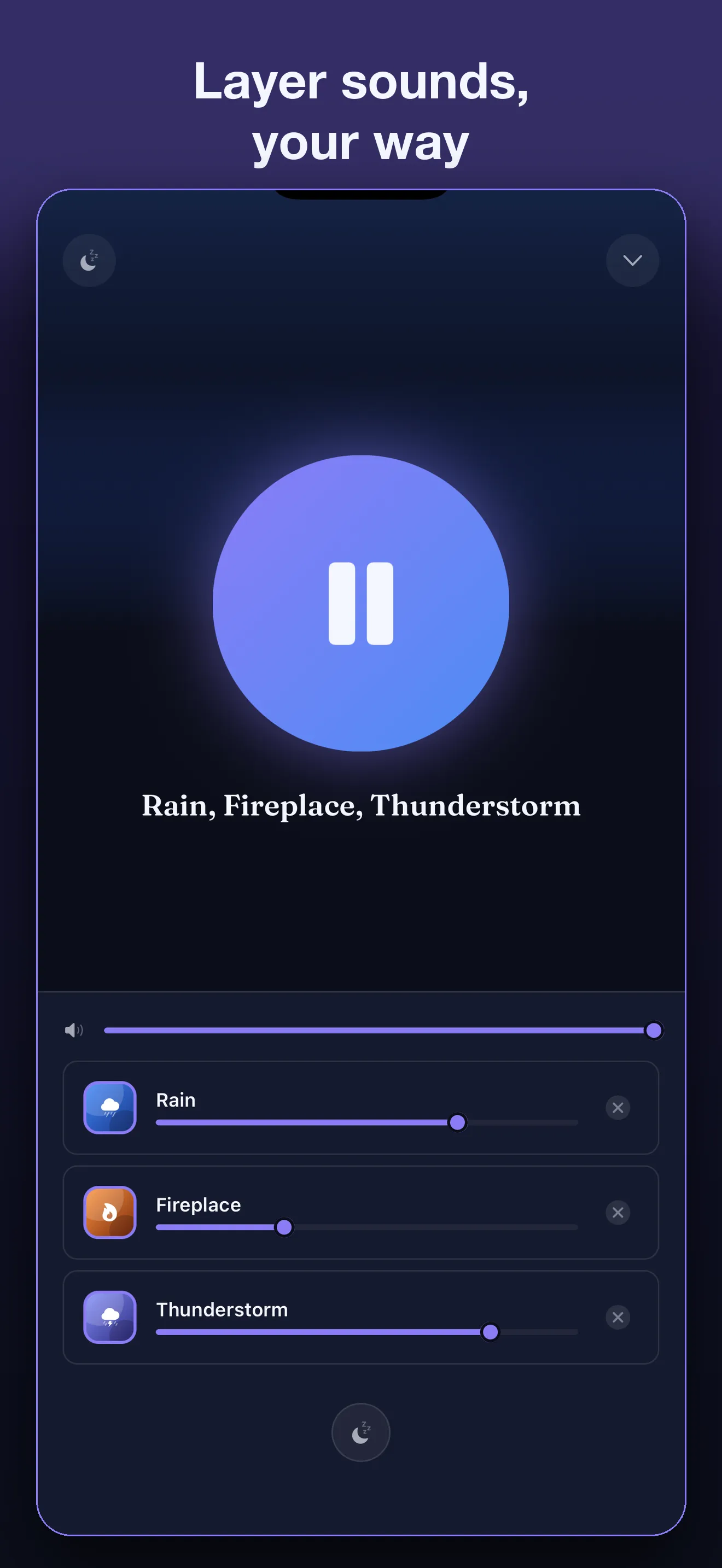
Uyu layers 47 sounds, from rain on a tin roof to a fire, a café and brown noise, with tones it makes live: binaural beats, 432 Hz and the solfeggio set. Each one gets its own volume. Set a timer, and it fades out as you drift off.
- Works offline
- No account
- Paid once, no subscription
A quick mix
Tap a sound to add or remove it, then press play.
Tap a sound to add it
Use headphones for binaural beats. Each ear hears its own pitch: 200 Hz on the left, 206 Hz on the right.
Rain, Fireplace
Paused
Rain and Fireplace are recordings from the app, released under CC0 by Ylmir and PagDev. Brown noise and the beat are made right here in your browser.
-
47 sounds
rain, water, nature, rooms and noise
-
15 tones
binaural beats and pure tones, or tune your own
-
A timer that fades
from 5 minutes to 3 hours
-
Paid once
no subscription, no ads
What it does
Every sound you want, in one mix
Most sound apps play one track at a time. Uyu plays as many as you like at once, each at its own level, so the room sounds the way you want it to.
-
Recordings
Recorded in real places
Hail on a street in Kraków, monsoon rain in Dharamshala, waves on the rocks near Muğla. Fans, a train, a café, and white, pink and brown noise too.
-
Tones
Tones under any sound
Binaural beats from 2 to 40 Hz, 432 Hz, 528 Hz and the solfeggio set, or tune your own. Set the level and the pitch for each ear.
-
Your mixes
Save it, name it, share it
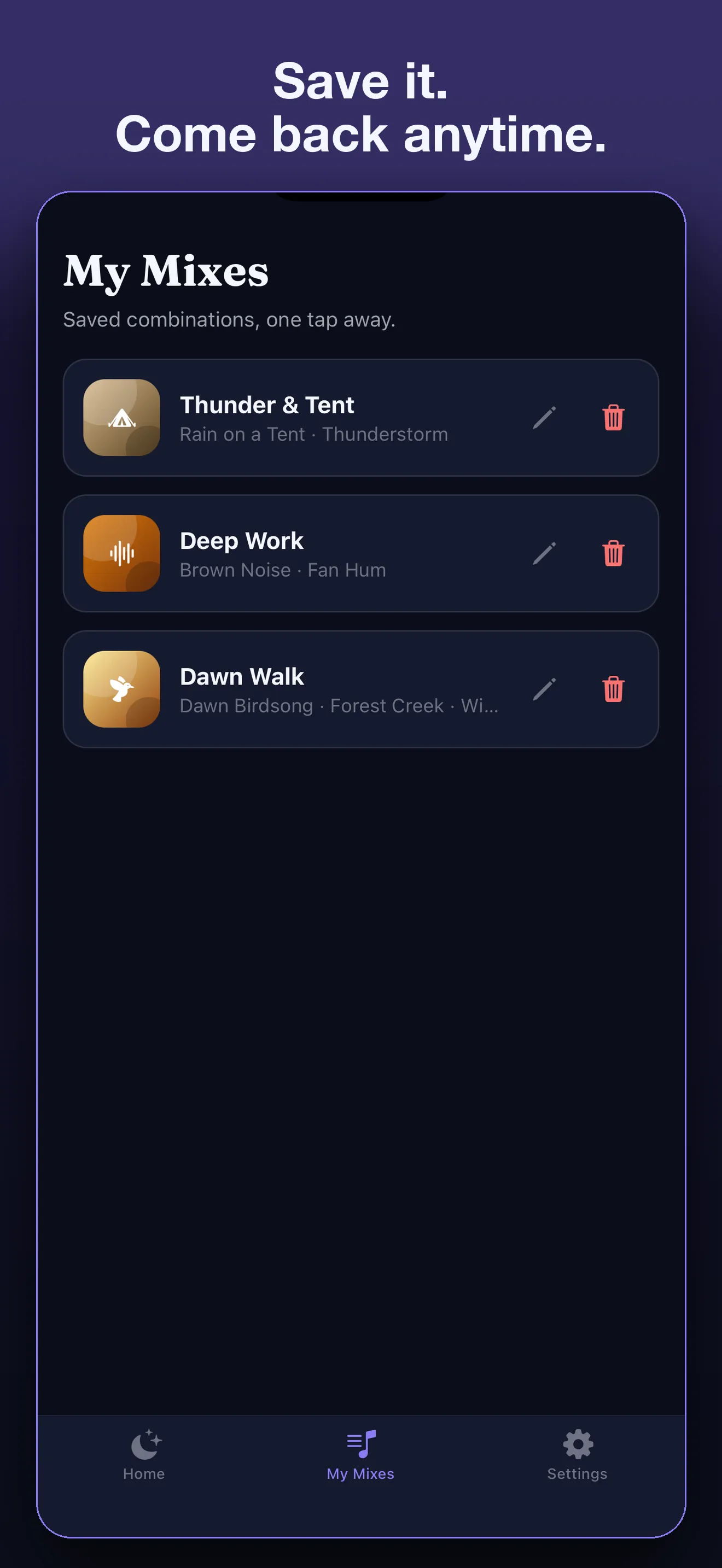
Keep the mixes you like, name them, and come back in one tap, or send one to a friend who has Uyu. Start from a ready-made mix like Rainy Night, or tap Surprise me.
How it works
Three steps, then sleep
-
Pick your sounds
Tap a sound to add it to your mix. Layer rain over brown noise, a fire under a tone, whatever you sleep to.
-
Set each one
Every sound has its own volume. For a tone you can go further and set each ear’s level and pitch.
-
Set the timer
Choose when it stops and Uyu fades it out. Still awake? Add 15 minutes from the Lock Screen.
The details
Made for a whole night
-
Loops you can’t hear
Each recording crossfades into itself, so there’s no click or gap every minute to pull you back awake.
-
A timer that fades
Pick 15 minutes or three hours. The sound can fade out gently instead of stopping dead.
-
On your Lock Screen
Your mix and when it stops show on the Lock Screen, in the Dynamic Island and in StandBy.
-
Under a podcast
Turn on Play alongside other audio and Uyu keeps going under an audiobook, a podcast or music.
-
Offline, no account
Every sound is on your phone. Nothing to sign up for, and it plays on a plane.
-
Gentle drift
Levels wander very slightly over time, so a long mix never sounds frozen. One switch turns it off.
What’s inside
47 sounds and 15 tones
Every sound in the app today, by family. Most are field recordings released to the public domain; the noises and the heartbeat were made for Uyu.
Rain 12
- Rain
- Thunderstorm
- Rain on a Window
- Rain on a Tent
- Heavy Downpour
- Rain on a Tin Roof
- Light Drizzle
- Rain and Hail
- Sleet on a Garage Door
- City Rain
- Monsoon Rain
- Rain in a Parked Car
Water 9
- Shore Waves
- Seaside Morning
- Waves on Rocks
- Flowing Stream
- Forest Creek
- Underground Stream
- Waterfall
- Fountain
- Shower
Nature 10
- Forest
- Pine Forest
- Dawn Birdsong
- Night Crickets
- Summer Meadow
- Wind
- Howling Wind
- Snow & Wind
- Wind in Dry Leaves
- Frog Chorus
Warm 4
- Fireplace
- Beehive
- Cicadas
- Coffee Shop
Indoors and travel 7
- Driving
- Airplane Cabin
- Fan Hum
- Inside a Train
- Refrigerator Hum
- Dishwasher
- Washing Machine
Noise 3
- White Noise
- Brown Noise
- Pink Noise
Animals and heartbeat 2
- Purring Cat
- Heartbeat
Tones 15
- 2 Hz Delta
- 6 Hz Theta
- 10 Hz Alpha
- 16 Hz Beta
- 40 Hz Gamma
- 432 Hz
- 174 Hz
- 285 Hz
- 396 Hz
- 417 Hz
- 528 Hz
- 639 Hz
- 741 Hz
- 852 Hz
- 963 Hz
- Make your own
Pricing
Pay once. That’s it.
Uyu is a paid download. One price gets you every sound and every tone. There’s no subscription, no ads and nothing to buy inside the app.
Uyu for iPhone
One price, paid once
- All 47 sounds and 15 tones
- Sleep timer, saved mixes, Lock Screen
- No subscription, no ads, no in-app purchases
The App Store shows the price in your currency before you buy.
Questions
Questions and answers
Is there a subscription?
No. Uyu is a paid download: you pay once on the App Store and everything is included. No subscription, no ads and no in-app purchases.
Does Uyu work offline?
Yes. Every sound is stored on your iPhone and the tones are made on it, so Uyu plays on a plane or with no signal at all.
Do I need headphones?
Only for binaural beats, which play a slightly different pitch in each ear. Everything else, pure tones included, sounds fine through a speaker.
Are tones a treatment?
No. People use tones for sleep, focus and relaxing, on their own or under rain or noise. Tones are for relaxation and focus — Uyu is not a medical device. If you have epilepsy, a seizure condition or a hearing condition, ask a doctor first.
Can I play Uyu with a podcast or music?
Yes. Turn on Play alongside other audio in Settings, start Uyu first, then the other app. Lock Screen controls are off while it’s on.
Will it stop by itself?
Set the sleep timer, anywhere from 5 minutes to 3 hours, and Uyu stops when it runs out, fading out first if you like. Still awake? Add 15 minutes.
Which languages does the app speak?
English, Turkish, German, Spanish and French.
Is Uyu on Android?
Not yet. Uyu is on iPhone first; Android is planned.
What does Uyu know about me?
There’s no account, and your mixes stay on your phone. Uyu sends anonymous usage statistics and crash reports, which one switch in Settings turns off. The privacy policy has the details.
Guides
Read before bed
Plain answers to the questions people ask about sleep sounds.
- Brown, white or pink noise for sleep What the noise colours actually are, how they cover the sounds that wake you, and how to choose one for your room. 6 min read
- Binaural beats: what they are and what they aren’t How two slightly different tones become a beat inside your head, why you need headphones, and what the research does and doesn’t show. 6 min read
Tonight, try your own mix.
Pick a few sounds, set the timer, and let Uyu fade out as you fall asleep.
Coming soon on the App StoreFor iPhone · Paid once